How to Upload (or Resubmit) Payment Proof
For orders paid by Mobile Money or Bank Transfer, the platform never touches the money directly - you pay the seller yourself, then tell the platform you did, so the seller can check and confirm before shipping.
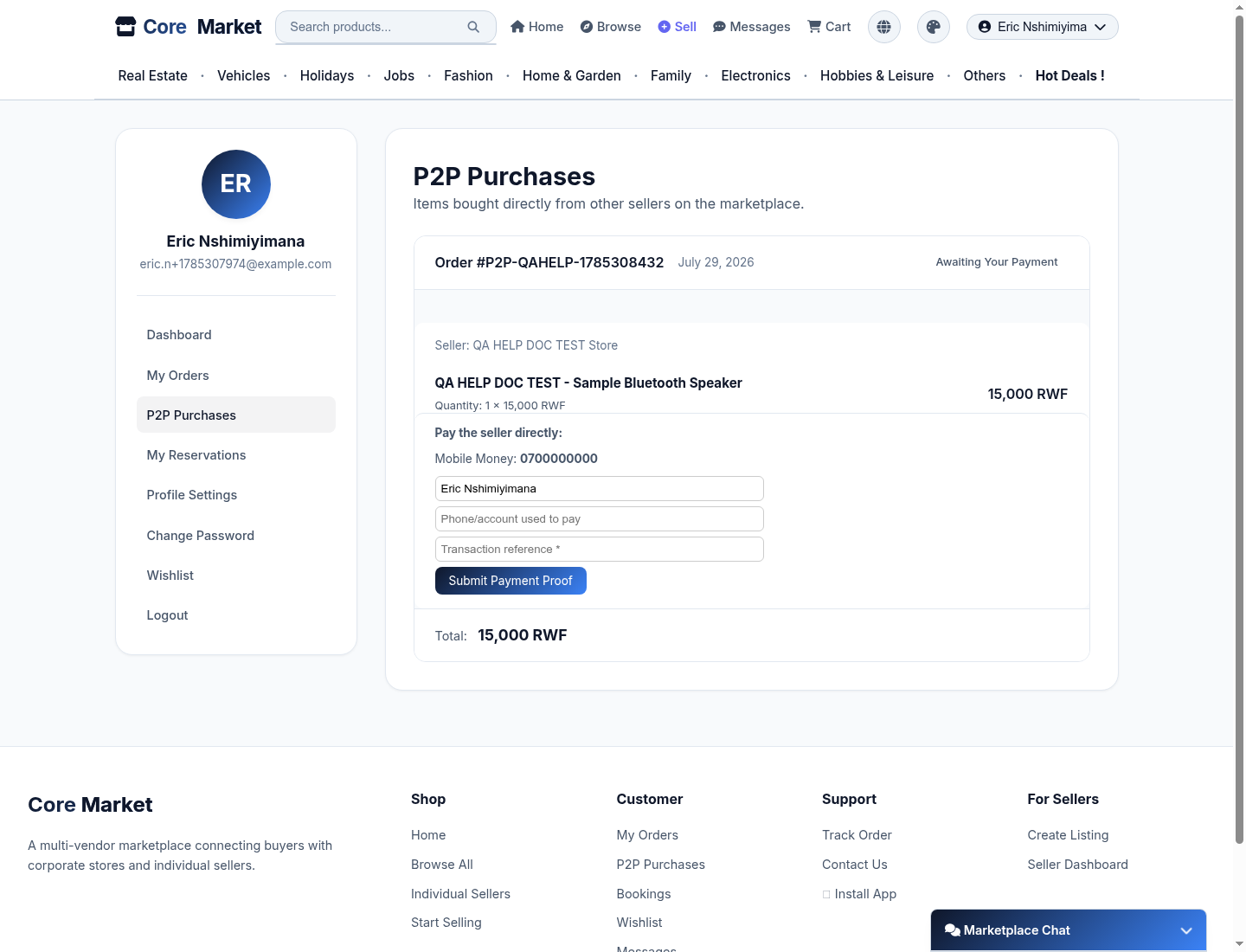
Find the order
Go to My Orders or P2P Purchases in your account. Any order marked "Awaiting Your Payment" is waiting on you to send money and submit proof.
Pay the seller directly
The order shows exactly where to send the money - a Mobile Money number, or a bank name, account number, and account holder, depending on how the seller is set up.
Submit your proof
Fill in your name, the phone number or account you paid from, and the transaction reference from your Mobile Money/bank confirmation message, then click Submit Payment Proof.
Made a mistake? Resubmit it
If the seller rejects your proof (wrong reference, mismatched name, etc.), the same form reappears so you can correct it and submit again.
What happens next
The seller reviews your proof and confirms it before shipping. If they don't respond, the order is automatically escalated to platform staff after a few days so it doesn't just stall - you don't need to do anything for that to happen.